1.6 Concluding Design Exercise: Robotic Warehouse Agent
To conclude Chapter 1, we will use the rational agent framework from Russell and Norvig to design a simple agent program for a robotic warehouse (Russell and Norvig, 2020, ch. 1-2). The goal is to practice the engineering loop: define an environment, specify goals, design an agent, and implement a working prototype.
1.6.1 Scenario: Robotic Warehouse
You manage a warehouse with autonomous robots that pick items from storage racks and deliver them to packing stations. Each robot navigates a grid with obstacles, shelves, and moving traffic. The system must balance speed, safety, and energy use.
1.6.2 Step 1: Define the Task Environment (PEAS)
Use the PEAS framework (Performance, Environment, Actuators, Sensors) to clarify the task.
- Performance: maximize items delivered per hour, minimize energy use, minimize late deliveries
- Environment: grid map with shelves, charging stations, pickup/dropoff points, other robots, time-varying congestion
- Actuators: move (N/E/S/W), wait, pick, drop
- Sensors: observation includes
local_grid,robot_pos,battery,steps,has_item,pickup_pos, anddropoff_pos; any distances must be computed by the agent from these valueslocal_grid: square window of characters centered on the robot, sized by the environment'sview_radiusrobot_pos:(row, col)position of the robot in grid coordinatesbattery: remaining battery steps (decrements each action)steps: total steps taken so far in the episodehas_item: whether the robot is currently carrying a pickuppickup_pos:(row, col)location of the pickup tiledropoff_pos:(row, col)location of the dropoff tile
1.6.3 Step 2: Classify the Environment
Describe the environment using standard properties:
- Partially observable: robots have local sensing, not full global state
- Stochastic: other robots and pickup requests add uncertainty
- Sequential: decisions affect future states and traffic
- Dynamic: tasks arrive over time; congestion changes
- Discrete: grid cells, actions, and time steps are discrete
These properties influence agent design and the kinds of algorithms that are realistic.
1.6.4 Step 3: Choose an Agent Architecture
For this exercise, we implement a simple goal-based agent with internal state. The agent:
- Tracks recent positions to detect loops (internal state)
- Computes Manhattan distance to the goal: \(|x_1 - x_2| + |y_1 - y_2|\), the grid distance assuming only N/S/E/W moves
- Chooses actions greedily to reduce Manhattan distance
- Falls back to random valid moves when stuck
This is a practical starting point—simpler than full path planning but smarter than pure reflex. Chapter 2 will show how to replace this greedy policy with optimal search algorithms like A*.
1.6.5 Step 4: Build the Warehouse Environment
We will use a minimal Gymnasium-style interface (without the Gymnasium dependency) so that the agent interacts with the environment using reset() and step(action) calls. This keeps the loop clear and future-proofs the code if you later want to use Gymnasium.
Key environment design choices:
- Grid world with walls (
#), empty cells (.), pickup (P), and dropoff (D) - Actions:
N,E,S,W,WAIT,PICK,DROP - Observation: a local grid window centered on the robot, plus state data (battery, steps, whether the robot carries an item)
- Reward shaping: small step penalty, pickup bonus, dropoff bonus
- Termination: success on a valid dropoff
- Truncation: max steps or battery depletion
- Randomized reset: random robot start, random pickup/dropoff placement
Save the environment file as:
teaching/notebooks-source/engineering-artificial-intelligence/chapter_introduction/warehouse_env.py
Source code for file warehouse_env.py
from dataclasses import dataclass
import random
from typing import Dict, List, Tuple, Union


Action = Union[int, str]


@dataclass
class WarehouseState:
    robot_pos: Tuple[int, int]
    has_item: bool
    battery: int
    steps: int


class WarehouseEnv:
    """
    Minimal, Gymnasium-style warehouse environment.
    - reset() -> observation
    - step(action) -> observation, reward, terminated, truncated, info
    """

    # Discrete action set for the agent.
    ACTIONS = ["N", "E", "S", "W", "WAIT", "PICK", "DROP"]
    MOVE_DELTAS = {
        "N": (-1, 0),
        "E": (0, 1),
        "S": (1, 0),
        "W": (0, -1),
    }

    def __init__(
        self,
        grid: List[str] | None = None,
        start_pos: Tuple[int, int] = (1, 1),
        max_steps: int = 200,
        battery: int = 200,
        view_radius: int = 2,
    ) -> None:
        # Legend: # = wall, . = empty, P = pickup, D = dropoff.
        self.grid = grid or [
            "############",
            "#..P....#..#",
            "#..##...#..#",
            "#......##..#",
            "#..#.......#",
            "#..#..D....#",
            "############",
        ] # Default warehouse layout
        self.height = len(self.grid)
        self.width = len(self.grid[0])
        self.start_pos = start_pos
        self.max_steps = max_steps
        self.max_battery = battery
        self.view_radius = view_radius
        self.state = WarehouseState(
            robot_pos=self.start_pos,
            has_item=False,
            battery=self.max_battery,
            steps=0,
        )

    def reset(self, randomize: bool = False) -> Dict[str, object]:
        start_pos = self.start_pos
        if randomize:
            self._randomize_pickup_dropoff()
            start_pos = self._random_empty_cell()
        self.state = WarehouseState(
            robot_pos=start_pos,
            has_item=False,
            battery=self.max_battery,
            steps=0,
        )
        return self._observe()

    def step(self, action: Action) -> Tuple[Dict[str, object], float, bool, bool, Dict[str, object]]:
        act = self._normalize_action(action)
        # Small step penalty encourages shorter paths.
        reward = -0.1
        terminated = False
        truncated = False
        info: Dict[str, object] = {}

        if act in self.MOVE_DELTAS:
            reward += self._move(act)
        elif act == "WAIT":
            reward -= 0.05
        elif act == "PICK":
            reward += self._pick()
        elif act == "DROP":
            reward += self._drop()
            if reward >= 9.0:
                terminated = True
        else:
            reward -= 0.5
            info["invalid_action"] = True

        self.state.steps += 1
        self.state.battery -= 1
        # Truncate when the time or battery budget runs out.
        if self.state.steps >= self.max_steps or self.state.battery <= 0:
            truncated = True

        return self._observe(), reward, terminated, truncated, info

    def render_grid(self) -> List[List[str]]:
        """Return a 2D grid of characters for animation or visualization."""
        rows = [list(r) for r in self.grid]
        r, c = self.state.robot_pos
        rows[r][c] = "R" if not self.state.has_item else "r"
        return rows

    def render(self) -> str:
        # Render the full grid with the robot position overlaid.
        rows = self.render_grid()
        return "\n".join("".join(r) for r in rows)

    def render_with_legend(self) -> str:
        legend = [
            "Legend:",
            "# = wall",
            ". = empty",
            "P = pickup",
            "D = dropoff",
            "R = robot (empty)",
            "r = robot (loaded)",
        ]
        return f"{self.render()}\n\n" + "\n".join(legend)

    def _normalize_action(self, action: Action) -> str:
        if isinstance(action, int):
            if 0 <= action < len(self.ACTIONS):
                return self.ACTIONS[action]
            return "INVALID"
        return action.upper()

    def _move(self, act: str) -> float:
        dr, dc = self.MOVE_DELTAS[act]
        r, c = self.state.robot_pos
        nr, nc = r + dr, c + dc
        if self._is_wall(nr, nc):
            return -1.0
        self.state.robot_pos = (nr, nc)
        return 0.0

    def _pick(self) -> float:
        r, c = self.state.robot_pos
        # Successful pickup is only allowed on a pickup tile.
        if self.grid[r][c] == "P" and not self.state.has_item:
            self.state.has_item = True
            return 5.0
        return -0.5

    def _drop(self) -> float:
        r, c = self.state.robot_pos
        # Successful drop is only allowed on a dropoff tile.
        if self.grid[r][c] == "D" and self.state.has_item:
            self.state.has_item = False
            return 10.0
        return -0.5

    def _is_wall(self, r: int, c: int) -> bool:
        if r < 0 or c < 0 or r >= self.height or c >= self.width:
            return True
        return self.grid[r][c] == "#"

    def _observe(self) -> Dict[str, object]:
        # Local observation centered on the robot, using view_radius.
        r, c = self.state.robot_pos
        local = []
        for dr in range(-self.view_radius, self.view_radius + 1):
            row = []
            for dc in range(-self.view_radius, self.view_radius + 1):
                rr, cc = r + dr, c + dc
                if rr < 0 or cc < 0 or rr >= self.height or cc >= self.width:
                    row.append("#")
                elif (rr, cc) == self.state.robot_pos:
                    row.append("R" if not self.state.has_item else "r")
                else:
                    row.append(self.grid[rr][cc])
            local.append("".join(row))
        pickup_pos = self._find_tile("P")
        dropoff_pos = self._find_tile("D")
        return {
            "local_grid": local,
            "robot_pos": self.state.robot_pos,
            "has_item": self.state.has_item,
            "battery": self.state.battery,
            "steps": self.state.steps,
            "pickup_pos": pickup_pos,
            "dropoff_pos": dropoff_pos,
        }

    def _random_empty_cell(self) -> Tuple[int, int]:
        empties = []
        for r, row in enumerate(self.grid):
            for c, ch in enumerate(row):
                if ch == ".":
                    empties.append((r, c))
        if not empties:
            return self.start_pos
        return random.choice(empties)

    def _randomize_pickup_dropoff(self) -> None:
        # Convert to mutable grid.
        rows = [list(r) for r in self.grid]
        positions = []
        for r, row in enumerate(rows):
            for c, ch in enumerate(row):
                if ch in {"P", "D"}:
                    rows[r][c] = "."
                if ch == ".":
                    positions.append((r, c))
        if len(positions) < 2:
            self.grid = ["".join(r) for r in rows]
            return
        pickup = random.choice(positions)
        positions.remove(pickup)
        dropoff = random.choice(positions)
        pr, pc = pickup
        dr, dc = dropoff
        rows[pr][pc] = "P"
        rows[dr][dc] = "D"
        self.grid = ["".join(r) for r in rows]

    def _find_tile(self, tile: str) -> Tuple[int, int] | None:
        for r, row in enumerate(self.grid):
            for c, ch in enumerate(row):
                if ch == tile:
                    return (r, c)
        return None
1.6.6 Step 5: Build the Visualization Tools
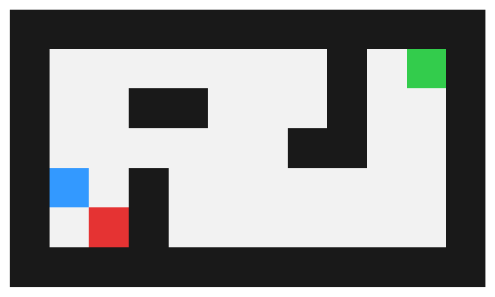
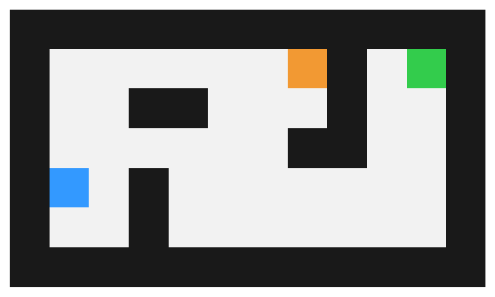
To make the exercise visually provocative, we include a simple visualization module with:
- Animated grid replay with step counter
- Reward, distance-to-goal plots over time
- Battery bar indicator
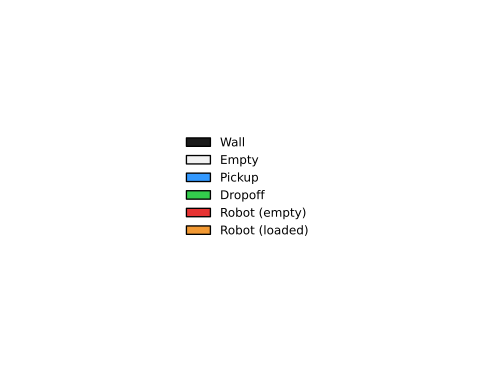
- SVG export for frames and a legend
- Pause/step controls (space bar to pause; arrows to step)
Save the visualization file as:
teaching/notebooks-source/engineering-artificial-intelligence/chapter_introduction/warehouse_viz.py
Source code for file warehouse_viz.py
from pathlib import Path


def _grid_to_rgb(grid: list[list[str]]) -> list[list[tuple[float, float, float]]]:
    colors = {
        "#": (0.1, 0.1, 0.1),
        ".": (0.95, 0.95, 0.95),
        "P": (0.2, 0.6, 1.0),
        "D": (0.2, 0.8, 0.3),
        "R": (0.9, 0.2, 0.2),
        "r": (0.95, 0.6, 0.2),
    }
    return [[colors.get(ch, (0.8, 0.8, 0.8)) for ch in row] for row in grid]


def _legend_handles():
    from matplotlib.patches import Patch

    colors = {
        "wall": (0.1, 0.1, 0.1),
        "empty": (0.95, 0.95, 0.95),
        "pickup": (0.2, 0.6, 1.0),
        "dropoff": (0.2, 0.8, 0.3),
        "robot (empty)": (0.9, 0.2, 0.2),
        "robot (loaded)": (0.95, 0.6, 0.2),
    }
    return [
        Patch(facecolor=colors["wall"], edgecolor="none", label="Wall"),
        Patch(facecolor=colors["empty"], edgecolor="none", label="Empty"),
        Patch(facecolor=colors["pickup"], edgecolor="none", label="Pickup"),
        Patch(facecolor=colors["dropoff"], edgecolor="none", label="Dropoff"),
        Patch(facecolor=colors["robot (empty)"], edgecolor="none", label="Robot (empty)"),
        Patch(facecolor=colors["robot (loaded)"], edgecolor="none", label="Robot (loaded)"),
    ]


def save_frames_to_svg(
    frames: list[list[list[str]]], output_dir: str, dpi: int = 120
) -> None:
    try:
        import matplotlib.pyplot as plt
    except ImportError:
        print("matplotlib not available; skipping SVG export.")
        return

    if not frames:
        return

    Path(output_dir).mkdir(parents=True, exist_ok=True)
    for i, frame in enumerate(frames):
        fig, ax = plt.subplots()
        ax.set_axis_off()
        ax.imshow(_grid_to_rgb(frame), interpolation="nearest")
        fig.savefig(Path(output_dir) / f"frame_{i:04d}.svg", dpi=dpi, bbox_inches="tight")
        plt.close(fig)

    fig, ax = plt.subplots()
    ax.set_axis_off()
    ax.legend(handles=_legend_handles(), loc="center", frameon=False, fontsize=9)
    fig.savefig(Path(output_dir) / "legend.svg", dpi=dpi, bbox_inches="tight")
    plt.close(fig)


def replay_animation(
    frames: list[list[list[str]]],
    metrics: dict | None = None,
    interval_ms: int = 150,
    speed: float = 1.0,
):
    try:
        import matplotlib.pyplot as plt
        from matplotlib import animation
    except ImportError:
        print("matplotlib not available; skipping animation replay.")
        return

    if not frames:
        return

    fig = plt.figure(figsize=(9.5, 5.8))
    gs = fig.add_gridspec(1, 2, width_ratios=[1.0, 1.3])
    gs_left = gs[0, 0].subgridspec(2, 1, height_ratios=[0.12, 1.0], hspace=0.0)
    gs_battery = gs_left[0, 0].subgridspec(1, 3, width_ratios=[0.35, 0.15, 0.5])
    ax_battery = fig.add_subplot(gs_battery[0, 1])
    ax_grid = fig.add_subplot(gs_left[1, 0])
    gs_metrics = gs[0, 1].subgridspec(2, 1, hspace=0.35)
    ax_top = fig.add_subplot(gs_metrics[0, 0])
    ax_bottom = fig.add_subplot(gs_metrics[1, 0])

    ax_grid.set_axis_off()
    im = ax_grid.imshow(_grid_to_rgb(frames[0]), interpolation="nearest")
    step_text = ax_grid.text(
        0.02,
        0.98,
        "Step 0",
        transform=ax_grid.transAxes,
        ha="left",
        va="top",
        fontsize=9,
        bbox=dict(boxstyle="round,pad=0.2", facecolor="white", alpha=0.8),
    )
    ax_grid.legend(
        handles=_legend_handles(),
        loc="upper left",
        bbox_to_anchor=(0.0, -0.05),
        frameon=False,
        fontsize=8,
        ncol=2,
    )

    lines = {}
    battery_bar = None
    if metrics:
        x = list(range(len(frames)))
        ax_top.set_xlim(0, 1)
        ax_top.set_xlabel("Step")
        ax_top.set_ylabel("Reward")
        ax_top.grid(True, alpha=0.3)
        if "rewards" in metrics:
            (line_reward,) = ax_top.plot(x[:1], metrics["rewards"][:1], label="Reward")
            lines["rewards"] = line_reward

        if "battery" in metrics:
            ax_battery.set_title("Battery", fontsize=8)
            ax_battery.set_xlim(0, 1)
            ax_battery.set_xticks([])
            max_battery = max(metrics["battery"]) if metrics["battery"] else 1
            ax_battery.set_ylim(0, max_battery)
            ax_battery.set_yticks([0, max_battery])
            ax_battery.grid(True, axis="y", alpha=0.3)
            battery_bar = ax_battery.bar([0.5], [metrics["battery"][0]], width=0.6)[0]

        ax_bottom.set_xlim(0, 1)
        ax_bottom.set_xlabel("Step")
        ax_bottom.set_ylabel("Distance")
        ax_bottom.grid(True, alpha=0.3)
        if "dist_pickup" in metrics:
            (line_pickup,) = ax_bottom.plot(
                x[:1], metrics["dist_pickup"][:1], label="Dist to Pickup"
            )
            lines["dist_pickup"] = line_pickup
        if "dist_dropoff" in metrics:
            (line_dropoff,) = ax_bottom.plot(
                x[:1], metrics["dist_dropoff"][:1], label="Dist to Dropoff"
            )
            lines["dist_dropoff"] = line_dropoff

        ax_top.legend(loc="upper left", fontsize=8)
        ax_bottom.legend(loc="upper right", fontsize=8)

    current = {"index": 0}

    def update(i: int):
        im.set_data(_grid_to_rgb(frames[i]))
        step_text.set_text(f"Step {i}")
        current["index"] = i
        if metrics:
            for key, line in lines.items():
                line.set_data(list(range(i + 1)), metrics[key][: i + 1])
            ax_top.set_xlim(0, max(1, i))
            ax_bottom.set_xlim(0, max(1, i))
            if "rewards" in lines:
                y = metrics["rewards"][: i + 1]
                ax_top.set_ylim(min(y) - 1, max(y) + 1)
            if "dist_pickup" in lines or "dist_dropoff" in lines:
                y1 = metrics.get("dist_pickup", [])[: i + 1]
                y2 = metrics.get("dist_dropoff", [])[: i + 1]
                ys = [v for v in y1 + y2 if y1 or y2]
                if ys:
                    ax_bottom.set_ylim(min(ys) - 1, max(ys) + 1)
            if battery_bar is not None:
                battery_bar.set_height(metrics["battery"][i])
        return [im, step_text] + list(lines.values()) + ([battery_bar] if battery_bar else [])

    effective_interval = max(10, int(interval_ms / max(speed, 0.1)))
    anim = animation.FuncAnimation(
        fig, update, frames=len(frames), interval=effective_interval, blit=False
    )

    paused = {"value": False}

    def on_key(event):
        if event.key == " ":
            if paused["value"]:
                anim.event_source.start()
            else:
                anim.event_source.stop()
            paused["value"] = not paused["value"]
        elif event.key in {"left", "right"}:
            if not paused["value"]:
                anim.event_source.stop()
                paused["value"] = True
            delta = -1 if event.key == "left" else 1
            current["index"] = max(0, min(len(frames) - 1, current["index"] + delta))
            update(current["index"])
            fig.canvas.draw_idle()

    fig.canvas.mpl_connect("key_press_event", on_key)
    plt.show()
    return anim
Example snapshots from the animation:
1.6.7 Step 6: Implement an Agent Program with Copilot
Now implement the agent using Copilot as your AI coding assistant. The hands-on exercise below provides step-by-step guidance.
Hands-On: Warehouse Agent Mini-Lab
Goal: Build a minimal greedy agent and evaluate it with visual feedback.
Files to create: - warehouse_agent_greedy.py: the agent logic - run_episode.py: episode runner with visualization
Implementation steps:
Review environment interface: Ask Copilot to review
warehouse_env.pyandwarehouse_viz.pyand summarize available observations and actions.Build greedy agent: Ask Copilot to create a greedy Manhattan agent:
- Compute Manhattan distance to the current goal (pickup if no item, dropoff if carrying)
- Choose the action (N/S/E/W) that reduces distance
- Fall back to a random valid move if stuck (all moves increase distance)
- Add a loop detector: track last N=10 positions; if current position visited recently, trigger random escape for a few steps
Create episode runner: Ask Copilot to write a single-episode script that:
- Resets the environment and initializes the agent to a random position
- Steps through one full episode using the agent
- Replays the animation with
warehouse_viz - Logs total reward, final battery, and episode length
Test and refine: Run several episodes, inspect animations, and note failure modes (e.g., oscillation, battery depletion). Adjust agent or environment as needed.
Suggested Copilot prompts: - "Create a greedy Manhattan agent that moves toward the current goal and falls back to a random valid move when stuck." - "Add a loop detector using the last 10 positions and trigger random escape moves for 3 steps when a loop is detected." - "Write a single-episode runner script that resets the environment, steps through one episode, and replays the animation."
Reflection questions: - When the agent escapes loops, does it reduce delivery time or create wandering behavior? - How does battery capacity affect success rate? - What happens if you increase the grid size or add more obstacles?
1.6.8 Why This Concludes Chapter 1
This exercise ties together the chapter's core themes:
- AI as an engineering tool (Copilot accelerates implementation)
- AI as a system component (the robot is an embedded agent)
- The rational agent framework as a design lens
- Clear task formulation with PEAS and environment classification
You now have a concrete warehouse environment and a working (if suboptimal) agent. This setup serves as the foundation for Chapter 2, where we will:
- Formulate warehouse navigation as a search problem
- Replace the greedy policy with optimal algorithms (uniform-cost search, A*)
- Handle multi-robot coordination and scheduling
Every algorithm we study can be viewed as a way to build better agent programs for real environments like this one.
Bibliography
- [AI] Russell, Stuart J. and Peter Norvig. Artificial intelligence: a modern approach. (2020) 4 ed. Prentice Hall. http://aima.cs.berkeley.edu/